Editor Overview
The visual editor is where quizzes get built. It has three panes — adding questions, previewing live, and configuring details all happen on one screen.
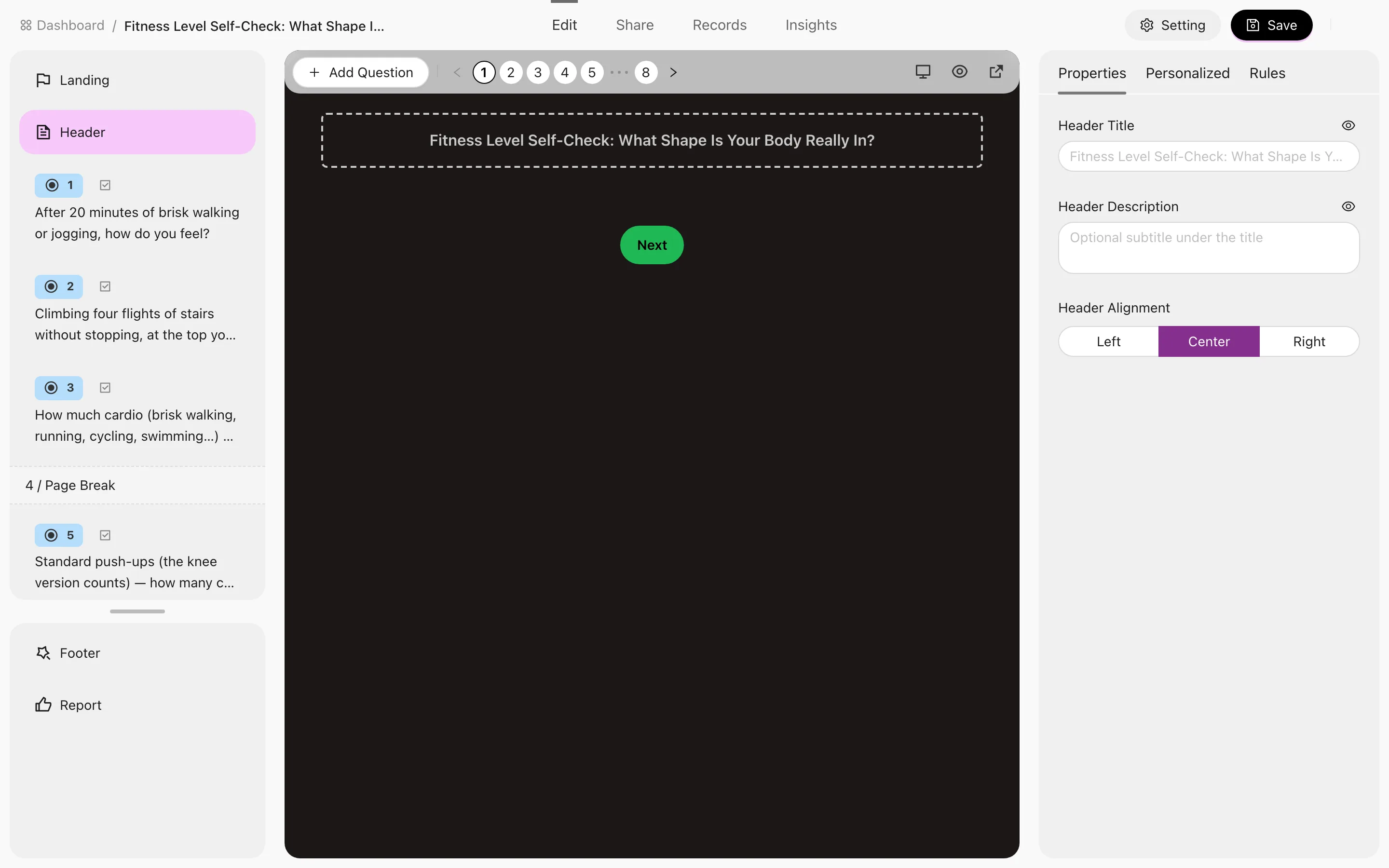
What each pane does
| Pane | Purpose |
|---|---|
| Left — question types | Every question type by category; click or drag to add one. For a Random Knowledge Quiz this pane is the Question Bank tab instead |
| Middle — preview | A live render from the respondent's point of view. Switch between Quiz and Report at the top, and on the report side choose a Preview Level or Preview outcome to see how different results look |
| Right — settings | Detailed configuration for whatever is currently selected |
The right pane's three tabs
| Tab | Contents | When it appears |
|---|---|---|
| Properties | The selected question's stem, options, required flag, score | Always |
| Personalized | Per-question appearance | Always |
| Rules | Conditional logic | Scored Quiz only |
If you can't find the Rules tab, it's usually not hidden — this quiz's type doesn't support it. See The four quiz types.
Common actions
- Add a question — pick a type from the left pane. Full list in Question types.
- Drag to reorder — rearrange questions directly. Remember that conditional logic needs the trigger question to sit before its target, so re-check your rules after reordering.
- Duplicate a question — copying and editing beats rebuilding a similar question from scratch.
- Page breaks — insert one to split a long quiz across pages instead of a single wall of questions.
- Rich text and images — question descriptions support rich text, including images.
Question limit
On the Free plan a quiz can hold up to 50 questions; Pro is unlimited.
- Only answerable questions count — page breaks, rich text blocks and image carousels don't. A random-question slot counts as the number of questions it draws.
- At the limit, adding or duplicating a question shows a notice and the upgrade prompt.
- Creating from a template or duplicating a quiz is never blocked, even past 50 questions. The new quiz follows the same rule as any other: you can edit and delete its questions, but not add more on Free.
- If your Pro plan ends, quizzes over 50 questions keep working and stay editable — you just can't add questions until you're back under the limit or upgrade.
What's along the top
- Preview — open the full respondent-view preview.
- Settings tab — everything that isn't a question (access, answering experience, language and more). See Quiz settings.
- Share button — link, QR code, share card, embed and distribution plan. See Publish & Share.
Where to go next
- Question types
- Conditional logic
- Scoring & assessment rules
- Appearance & personalized templates
- Multilingual versions
Remember to save — you'll get a confirmation. Before publishing, walk both the Quiz and Report previews, especially for quizzes with conditional logic or multi-dimension scoring.
Workspace: Groups, Favorites & Trash
Keep a growing dashboard tidy with groups, favourites, search and trash: how each one works, the limits that apply, and how long a deleted quiz stays recoverable before it is gone.
Question Types
The 11 RooQuiz answer question types plus display blocks, grouped by purpose — choice, input, rating, ordering and more — what each one collects, where it fits, and which quiz type can use it.